s50
アンチウィルスソフトの導入(Clam AntiVirus).
Clam AntiVirus をインストールします。
[root@www ~]# 50_1dnf -y install clamav clamav-update
s51Clam AntiVirus を設定します。
[root@www ~]# 51_1vi /etc/freshclam.conf
s528行目:行頭に「#」を追記してコメント化します。
52_1#Example
s53パターンファイルを更新します。
[root@www ~]# 53_1freshclam

ClamAV update process started at Sun Jun 30 23:51:01 2019
main.cvd is up to date (version: 58, sigs: 4566249, f-level: 60, builder: sigmgr)
daily.cld is up to date (version: 25496, sigs: 1606212, f-level: 63, builder: raynman)
bytecode.cvd is up to date (version: 328, sigs: 94, f-level: 63, builder: neo)
s54スキャンを実行して動作確認します。
[root@www ~]# 54_1clamscan --infected --remove --recursive /home


----------- SCAN SUMMARY -----------
Known viruses: 6163086
Engine version: 0.101.2
Scanned directories: 38
Scanned files: 23
Infected files: 0
Data scanned: 0.00 MB
Data read: 0.00 MB (ratio 0.00:1)
Time: 179.738 sec (2 m 59 s)
s55テスト用無害ウィルスをダウンロードします。
[root@www ~]# 55_1wget http://www.eicar.org/download/eicar.com
s56スキャンを実行して動作確認します。
[root@www ~]# 56_1clamscan --infected --remove --recursive .

----------- SCAN SUMMARY -----------
Known viruses: 6163097
Engine version: 0.101.2
Scanned directories: 3
Scanned files: 10
Infected files: 1
Data scanned: 0.00 MB
Data read: 0.00 MB (ratio 0.00:1)
Time: 179.738 sec (2 m 59 s)
s57
ファイル改竄検知システムの導入(Tripwire).
Tripwire をインストールします。
[root@www ~]# 57_1dnf -y install tripwire
s58Tripwire の初期設定をします。
[root@www ~]# 58_1tripwire-setup-keyfiles
s59サイトキーファイルのパスフレーズを設定します。
Enter the site keyfile passphrase: サイトキーファイルのパスフレーズ(英数字)
Verify the site keyfile passphrase: サイトキーファイルのパスフレーズ(英数字)
s60ローカルキーファイルのパスフレーズを設定します。
Enter the local keyfile passphrase: ローカルキーファイルのパスフレーズ(英数字)
Verify the local keyfile passphrase: ローカルキーファイルのパスフレーズ(英数字)
s61サイトキーファイルのパスフレーズを入力します。
Please enter your site passphrase: サイトキーファイルのパスフレーズ
s62サイトキーファイルのパスフレーズを入力します。
Please enter your site passphrase: サイトキーファイルのパスフレーズ
s63「/etc/tripwire」へディレクトリを移動します。
[root@www ~]# 63_1cd /etc/tripwire
s64初期設定をします。
[root@www tripwire]# 64_1vi twcfg.txt
s6512行目:報告レベルを最大に変更します。
REPORTLEVEL = 65_14
s66設定ファイルを生成します。
[root@www tripwire]# 66_1twadmin -m F -c tw.cfg -S site.key twcfg.txt
s67サイトキーファイルのパスフレーズを入力します。
Please enter your site passphrase: サイトキーファイルのパスフレーズ
Wrote configuration file: /etc/tripwire/tw.cfg
s68ポリシーを最適化します。
[root@www tripwire]# 68_1vi twpolmake.pl
s69行頭に「#」が自動挿入される場合は2回に分けて作成します。
69_1#!/usr/bin/perl
# ----------------------------------------------------------------
# Copyright (C) 2003 Hiroaki Izumi
# This program is free software; you can redistribute it and/or
# modify it under the terms of the GNU General Public License
# as published by the Free Software Foundation; either version 2
# of the License, or (at your option) any later version.
# This program is distributed in the hope that it will be useful,
# but WITHOUT ANY WARRANTY; without even the implied warranty of
# MERCHANTABILITY or FITNESS FOR A PARTICULAR PURPOSE. See the
# GNU General Public License for more details.
# You should have received a copy of the GNU General Public License
# along with this program; if not, write to the Free Software
# Foundation, Inc., 59 Temple Place - Suite 330, Boston, MA 02111-1307, USA.
# ----------------------------------------------------------------
# Usage:
# perl twpolmake.pl {Pol file}
# ----------------------------------------------------------------
#
#ここまでを1回目で作成して行頭に「#」の無い行を作成して、以下をコピペします。
69_2$POLFILE=$ARGV[0];

open(POL,"$POLFILE") or die "open error: $POLFILE" ;
my($myhost,$thost) ;
my($sharp,$tpath,$cond) ;
my($INRULE) = 0 ;

while (<POL>) {
    chomp;
    if (($thost) = /^HOSTNAME\s*=\s*(.*)\s*;/) {
        $myhost = `hostname` ; chomp($myhost) ;
        if ($thost ne $myhost) {
            $_="HOSTNAME=\"$myhost\";" ;
        }
    }
    elsif ( /^{/ ) {
        $INRULE=1 ;
    }
    elsif ( /^}/ ) {
        $INRULE=0 ;
    }
    elsif ($INRULE == 1 and ($sharp,$tpath,$cond) = /^(\s*\#?\s*)(\/\S+)\b(\s+->\s+.+)$/) {
        $ret = ($sharp =~ s/\#//g) ;
        if ($tpath eq '/sbin/e2fsadm' ) {
            $cond =~ s/;\s+(tune2fs.*)$/; \#$1/ ;
        }
        if (! -s $tpath) {
            $_ = "$sharp#$tpath$cond" if ($ret == 0) ;
        }
        else {
            $_ = "$sharp$tpath$cond" ;
        }
    }
    print "$_\n" ;
}
close(POL) ;

[root@www tripwire]# 69_3perl twpolmake.pl twpol.txt > twpol.txt.new
[root@www tripwire]# 69_4twadmin -m P -c tw.cfg -p tw.pol -S site.key twpol.txt.new
s71サイトキーファイルのパスフレーズを入力します。
Please enter your site passphrase: サイトキーファイルのパスフレーズ
Wrote configuration file: /etc/tripwire/tw.pol
s72データベースを作成します。
[root@www tripwire]# 72_1tripwire -m i -s -c tw.cfg
s73ローカルキーファイルのパスフレーズを入力します。
Please enter your local passphrase: ローカルキーファイルのパスフレーズ
s74ディレクトリを戻ります。
[root@www tripwire]# 74_1cd
s75チェックを実行します。(定期チェックは日次でチェック実行されます。)
[root@www ~]# 75_1tripwire -m c -s -c /etc/tripwire/tw.cfg
Open Source Tripwire(R) 2.4.2.2 Integrity Check Report

Report generated by:          root
...
...
...
All rights reserved.
s76チェック結果を確認します。
[root@www ~]# 76_1ll /var/lib/tripwire/report
total 4
-rw-r--r-- 1 root root 1821526 6月 29 07:58 server.jp-20190629-075230.twr
-rw-r--r-- 1 root root 1830182 6月 30 06:09 server.jp-20190630-060029.twr
-rw-r--r-- 1 root root 1829590 7月 1 09:29 server.jp-20190701-092314.twr
-rw-r--r-- 1 root root 1828518 7月 1 17:27 server.jp-20190701-171400.twr
s77レポートを指定してデータベースを更新します。
[root@www ~]# 77_1tripwire -m u -a -s -c /etc/tripwire/tw.cfg -r /var/lib/tripwire/report/server.jp-20190701-171400.twr
s78ローカルキーファイルのパスフレーズを入力します。
Please enter your local passphrase: ローカルキーファイルのパスフレーズ
s79
rootkit検知システム導入(RkHunter).
RKHunter をインストールします。
[root@www ~]# 79_1dnf -y install rkhunter
s80RKHunter を設定します。
[root@www ~]# 80_1vi /etc/sysconfig/rkhunter
s81レポートを送信する宛先とスキャンモードを設定します。
81_1#レポートを送信する宛先
MAILTO=root@localhost
#スキャンモード
DIAG_SCAN=no
s82データベースをアップデートします。
[root@www ~]# 82_1rkhunter --update
s83システムのファイル情報をアップデートします。
[root@www ~]# 83_1rkhunter --propupd
s84チェックを実行します。
[root@www ~]# 84_1rkhunter --check --sk
[ Rootkit Hunter version 1.4.2 ]

Checking system commands...
...
...
No warnings were found while checking the system.
s85
SSHサーバー公開鍵認証方式接続の設定.
サーバーの公開鍵の作成.
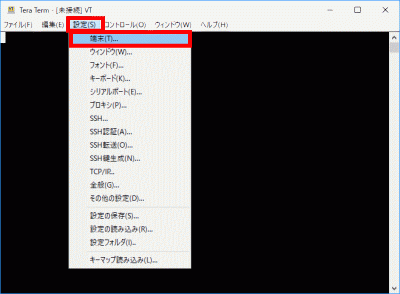
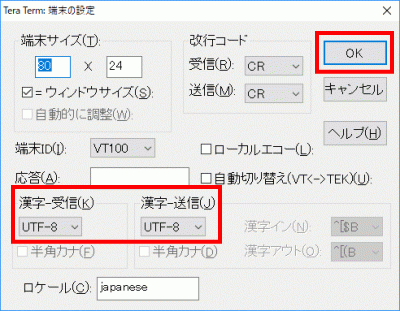
TeraTermを起動し、ユーザーでログインし公開鍵、秘密鍵を作成します。
[webmaster@www ~]$ 85_1ssh-keygen -t ecdsa
s86「Enter」を押下します。
Generating public/private ecdsa key pair.
Enter file in which to save the key (/home/webmaster/.ssh/id_ecdsa):
s87「パスフレーズ」を設定します。
Enter passphrase (empty for no passphrase):パスフレーズ
Enter same passphrase again:パスフレーズ
s88公開鍵を「.ssh/」へ転送します。
[webmaster@www ~]$ 88_1mv ~/.ssh/id_ecdsa.pub ~/.ssh/authorized_keys
s89ログイン設定を行います。
[webmaster@www ~]$ 89_1chmod 700 .ssh/
s90rootでログインして秘密鍵を「/samba/share」に転送します。
[root@www ~]# 90_1mv /home/webmaster/.ssh/id_ecdsa /samba/share
[root@www ~]# 90_2chmod 777 /samba/share/id_ecdsa
s91クライアントPCのSambaショートカットから「id_ecdsa」ファイルを任意の場所(SSH鍵/秘密鍵/)に保存します。
接続テスト.
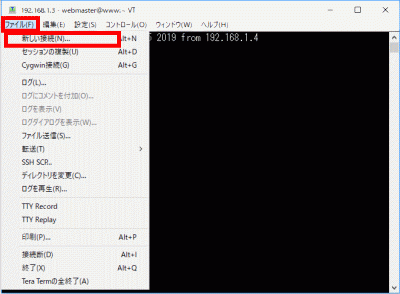
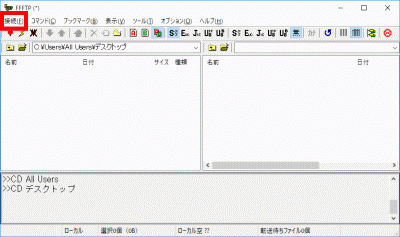
「新しい接続」を選択します。
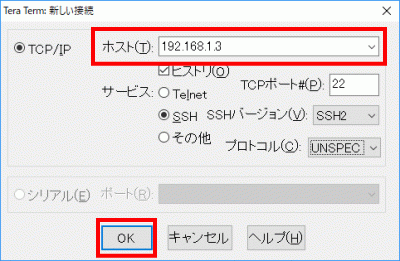
s92「ホスト」にIPアドレスを入力して、「OK」をクリックします。
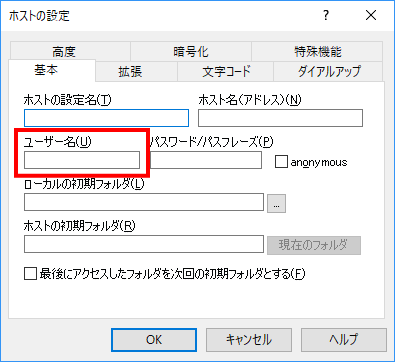
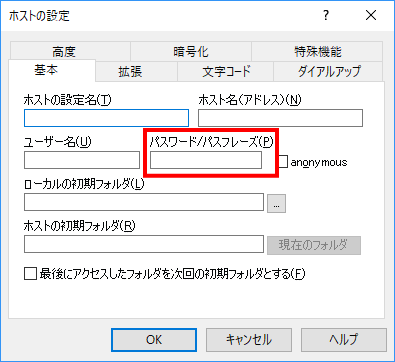
s93「ユーザー名」、「パスフレーズ(鍵のパスフレーズ)」を入力します。
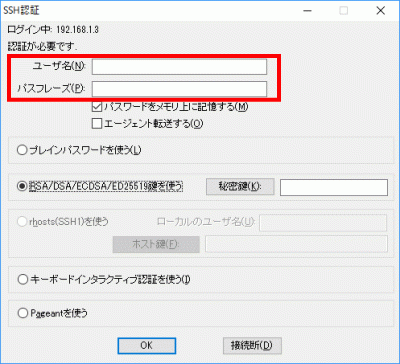
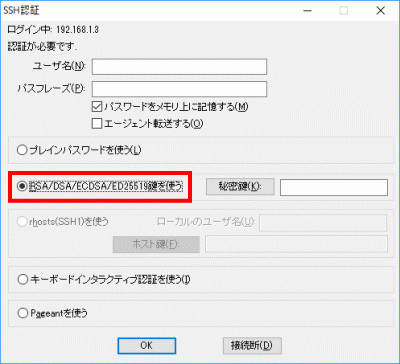
s94「RSA/DSA/ECDSA/ED25519鍵を使う」を選択します。
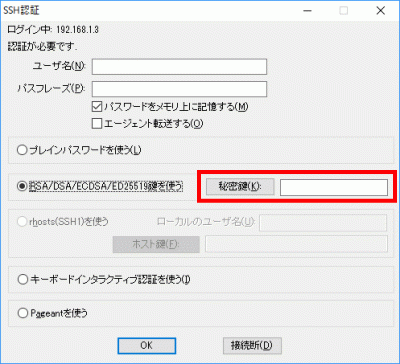
s95「秘密鍵」をクリックして、保存した「SSH鍵/秘密鍵/id_ecdsa」を選択します。
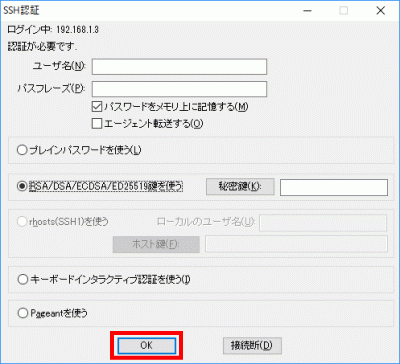
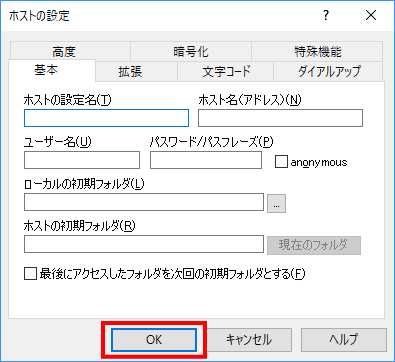
s96「OK」をクリックして接続を確認します。
s97rootへログインします。
[webmaster@www ~]$ 97_1su -
パスワード:
s98
秘密鍵での認証接続.
バックアップを作成します。
[root@www ~]# 98_1cp -p /etc/ssh/sshd_config /etc/ssh/sshd_config_bck
s99編集します。
[root@www ~]# 99_1vi /etc/ssh/sshd_config
s10065行目:「yes」→「no」に変更します。
PasswordAuthentication 100_1no
s101SSHを再起動します。
[root@www ~]# 101_1systemctl restart sshd



 s65
s65 s75
s75 s81
s81 s91
s91